
Apple’s iPhone is packed with clever features, but many users only scratch the surface. Beyond predictive text and emoji suggestions, your iPhone keyboard hides shortcuts that can make everyday tasks faster. Two of the most underrated ones are the “Look Up” shortcut and the “Search Web” shortcut.
1. Look Up Words Instantly Without Opening a Browser
If you come across a new word while reading on your iPhone, you don’t need to copy, paste, and search manually. Instead:
- Tap and hold on the word until it’s highlighted.
- From the pop-up menu, select “Look Up.”

This shortcut instantly shows you:
- Dictionary definitions
- Siri Knowledge results
- Wikipedia entries
- Suggested websites
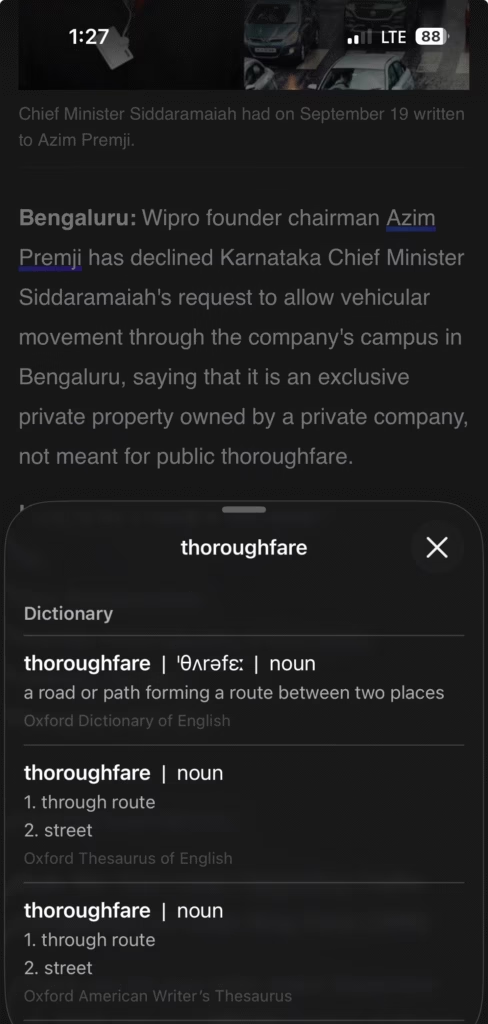
It’s like having a built-in pocket dictionary and mini search engine right inside iOS. Students, professionals, and even casual readers can benefit from this hidden gem.
2. Search the Web Directly From Any Text
Let’s say you read a phrase in a PDF, email, or article, and you want to know more about it. Instead of memorizing and typing it into Safari:
- Highlight the word or phrase.
- Tap “Search Web.”
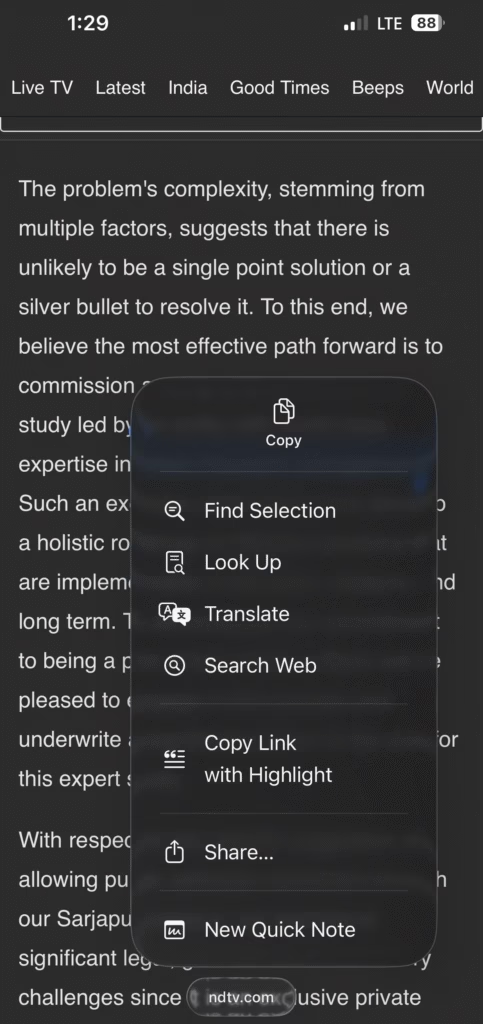
Your iPhone automatically opens a search page in Safari with results related to the highlighted text. This trick saves time, cuts down on typos, and keeps your workflow smooth.
Why These Shortcuts Matter
Most people don’t realize they’re already built into iOS. By mastering these rarely used keyboard shortcuts, you can:
- Save time on repetitive searches
- Get context instantly while reading
- Avoid app switching and typing overhead
They might look small, but once you start using them, you’ll wonder how you managed without them. The iPhone keyboard is more powerful than it looks. With “Look Up” and “Search Web,” you can turn text into instant knowledge in just two taps. And here’s a bonus tip – these features also work the exact same way on iPad and Mac.
So, next time you’re deep in an article or email, try them out—you’ll see how Apple’s subtle shortcuts keep you productive.